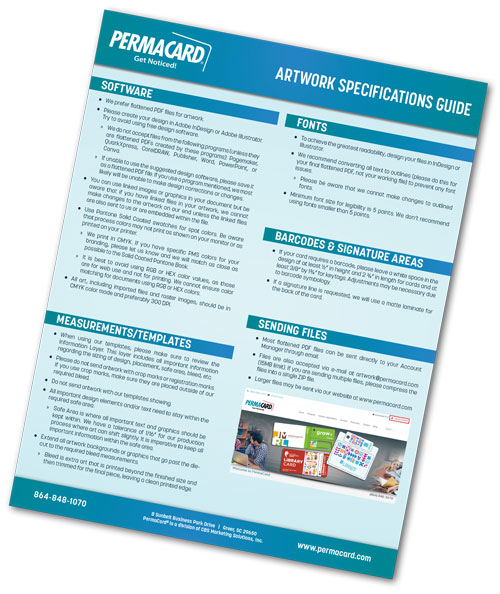
Artwork Specifications for Custom Plastic Cards & Promotional Products
Properly prepared artwork ensures your printed cards and promotional items look sharp, accurate, and professional. To help you achieve the best possible results, PermaCard provides clear artwork guidelines for all products.
Below you’ll find everything you need to know about file formats, color settings, bleed, safe zones, variable data, and submission requirements.
For the highest print quality, we recommend submitting artwork in one of the following formats:
- Preferred: Adobe Illustrator (.ai), Adobe Photoshop (.psd), Adobe InDesign (.indd), PDF/X 1a
- Also accepted: EPS, TIFF, high resolution JPG or PNG
- Vector artwork is strongly recommended for logos, text, and line art
- Fonts should be outlined or included with the file
If you’re unsure which format to use, our design team can help prepare your artwork.
- Raster images: 300 dpi minimum
- Line art: 600 dpi recommended
- Low-resolution images may appear blurry or pixelated
- Avoid screenshots
Bleed
- Extend artwork 0.125" beyond trim
Safe Zone
- Keep important elements 0.125" inside trim
Trim Size
- Standard card: 3.375" x 2.125"
- Other products vary
Templates are available upon request.
- Submit artwork in CMYK
- RGB will be converted and may shift
- Spot colors available when specified
- Specialty inks require approval
If color accuracy is critical, request a printed proof.
- Provide CSV or Excel data
- Label columns clearly
- Images at 300 dpi minimum
- Barcodes must be scan-ready
Our team will review all data before production.
- Plastic cards
- Key tags
- Combo cards
- Mailers & credentials
- Custom items
Contact our team to request the correct template.
- Upload files through our website
- Upload via Account Manager
- Email files
- Provide a cloud storage link
Our design team is here to help you create print-ready files that look great and meet all production requirements.
Click here to download Artwork Specifications.